If you’re a student today, you know about the many AI tools out there. I’ve tried different educational technologies to make studying easier and more efficient!
The world of AI in education is changing fast. It’s exciting to find the best tools that can really help you learn. From AI-powered study assistants to advanced research tools, there’s a lot to choose from.
Finding the best AI tools for education can seem hard. But it’s worth it to do well in school in 2025. Let’s look at the top AI tools for students that can improve your learning!
Key Takeaways
- Discover the top AI tools that can streamline your study routine.
- Explore AI-powered study assistants that can boost your productivity.
- Learn about advanced research tools that can aid in your academic success.
- Understand how AI in education is transforming the learning experience.
- Get insights into the best AI tools for education that can make a real difference.
The Rise of AI in Education
AI in education is more than a trend; it’s a big change. It’s changing how we learn and teach. Understanding AI’s power to improve learning is key.
How AI is Transforming Student Learning
AI tools are making learning more accessible and personal. For example, AI systems adjust to each student’s needs. They give feedback and help right away. AI in education is about making learning better and more fun.
“AI can change learning by offering personal support and improving results,” an expert says. This shows how important AI is in today’s education.
Key Benefits for Academic Success
AI in education brings many benefits for students. Some main advantages are:
- Learning experiences that fit each student’s needs
- Easier access to learning resources
- Better grades with feedback anytime
- Help with managing time and staying organized
Using these student success tools, students can reach their goals better. As AI grows, we’ll see even more ways to change education.
The 9 Best AI Tools for Students in 2025
2025 is set to bring exciting AI tools to help students learn better and work smarter. We’ve picked the top 9 AI tools for students. It’s important to know why we chose them and how to use them in your studies.
Selection Criteria for Our List
We looked at several important factors to make our list. We focused on ease of use, how well they improve learning, and if they work with different learning platforms. Our goal is to offer tools that help with everything from taking notes to managing projects.
| Criteria | Description | Importance Level |
|---|---|---|
| Ease of Use | User-friendly interface and simple navigation | High |
| Effectiveness | Proven track record of improving learning outcomes | High |
| Compatibility | Seamless integration with popular educational platforms | Medium |
How to Integrate These Tools into Your Study Routine
Adding AI tools to your study routine can really help you do better in school. First, figure out what you need help with. Maybe you want to get better at writing with Grammarly Ultra or organize your notes with Notion AI. Try out different tools to see what fits you best. You might even use more than one tool to make your study routine your own.
By choosing and using these AI tools wisely, you can make learning more efficient and fun. As you try these tools, you’ll find new ways to succeed in school and get ready for what’s ahead.
1. ChatGPT-5: Your Personal AI Study Assistant
ChatGPT-5 is a top tool for AI-powered learning. It makes studying easier for students. This AI study assistant offers personalized help for various academic tasks.

Step-by-Step Setup Guide for Students
To start with ChatGPT-5, just follow these steps:
- Create an account on the ChatGPT platform.
- Customize your settings to fit your academic needs.
- Check out the features and tools for students.
How to Create Effective Prompts for Academic Tasks
Creating good prompts is key for ChatGPT-5. Here’s how:
- Be clear about what you need help with, like “research paper assistance” or “essay structuring.”
- Give context for the task, including any important details or requirements.
Research Paper Assistance Techniques
ChatGPT-5 is great for research papers. It can assist with:
- Choosing a topic and refining it.
- Outlining and structuring your paper.
- Finding sources and citations.
Essay Structure and Feedback Methods
ChatGPT-5 also helps with essays. It can:
- Suggest essay structures and outlines.
- Give feedback on drafts, including ways to improve.
Using ChatGPT-5 as your AI study assistant can make studying easier. It helps with writing and can lead to better grades. With its advanced features and easy-to-use interface, ChatGPT-5 is a must-have academic writing tool for students aiming to succeed.
2. Notion AI: Comprehensive Note-Taking and Organization
For students wanting to make studying easier, Notion AI is a great choice. It’s an all-in-one workspace that keeps you organized and focused. This helps a lot during your school years.

Setting Up Your Notion AI Workspace for Classes
To start with Notion AI, create a special workspace for your classes. You’ll need to set up different pages for each subject or project. Notion AI lets you tailor your workspace to fit your needs, whether for notes, tasks, or planning projects.
Creating Smart Templates for Different Subjects
Notion AI lets you make smart templates for different subjects or tasks. For example, you can make a template for lecture notes with sections for key points, questions, and summaries. This makes your notes consistent and easy to review.
Building Automated Study Schedules
Notion AI is great for making automated study schedules. You can create a template that includes your tasks, deadlines, and study goals. This way, you can keep up with your school work without feeling stressed.
Managing Group Projects Efficiently
Notion AI also makes managing group projects easy. You can set up a shared workspace for your team. Here, everyone can work together on documents, track progress, and talk easily. This teamwork feature is super helpful for group assignments.
Using Notion AI’s features can really boost your productivity and organization. It’s great for making custom templates, setting up study schedules, or handling group projects. Notion AI is a key tool for success in school.
3. Ultra: Perfect Your Academic Writing
Grammarly Ultra uses advanced AI to help students improve their academic writing. It makes sure your papers are not just right but also interesting and well-organized.
Configuring Grammarly for Academic Writing Standards
To use Grammarly Ultra well, you need to set it up for academic writing. Choose the formal writing style to avoid casual language and slang.
Key Configuration Steps:
- Select the “Academic” writing style
- Enable grammar and punctuation checks
- Adjust the tone to be formal
Using Advanced Style and Tone Adjustments
Grammarly Ultra lets you tweak your writing’s style and tone. This ensures your work is not only correct but also engaging and suitable for your audience.
Mastering Citation and Reference Checking
Proper citation and referencing are key in academic writing. Grammarly Ultra helps manage these, making sure they match your chosen style (APA, MLA, Chicago, etc.).
| Citation Style | Grammarly Ultra Features |
|---|---|
| APA | Automatic formatting, citation suggestions |
| MLA | Works Cited page generation, in-text citation checks |
| Chicago | Bibliography creation, footnote/endnote management |
Implementing Plagiarism Prevention Strategies
Grammarly Ultra fights plagiarism with its tools. It scans your work against a huge database to find and fix any plagiarism.
Good plagiarism prevention means checking for copied content and ensuring your citations are correct and formatted right.
4. Otter.ai Scholar: AI-Powered Lecture Transcription
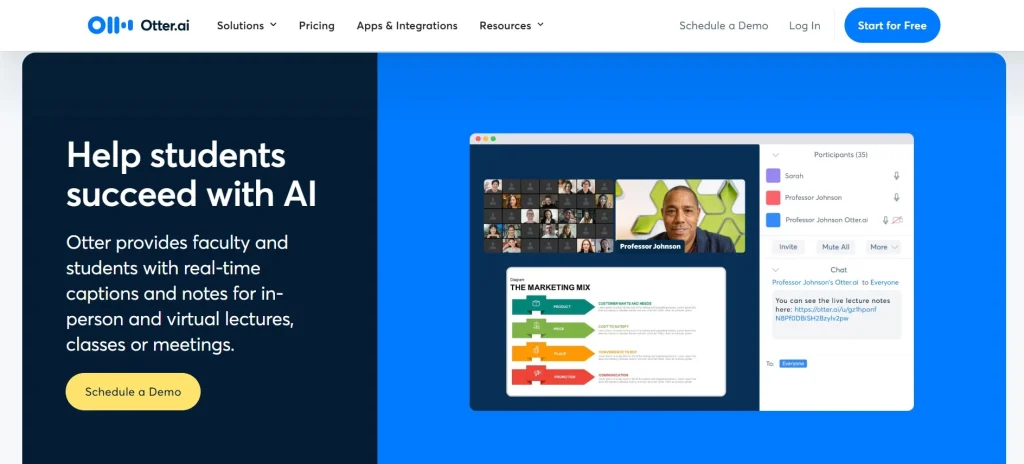
Otter.ai Scholar changes how we learn by making lecture notes easy to get and keep up with. It uses AI to catch and sort out key points from class, making it a must-have for students.
Recording and Transcribing Lectures Effectively
To make the most of Otter.ai Scholar, know how to record and write down lectures well. First, find a quiet spot to avoid background noise. Otter.ai Scholar’s AI can handle different sounds, but clear audio is crucial for good notes.
Tips for Effective Recording:
- Put your device where it can best hear the speaker’s voice.
- Use an external mic for better sound quality.
- Keep away from distractions and noise.
Organizing and Searching Through Transcripts
Otter.ai Scholar does more than just write down lectures. It also helps you sort and find what you need in the notes. This is super helpful when studying for tests or working on projects that need specific lecture parts.
Converting Transcripts into Study Materials
You can turn notes into study aids by marking important parts and sending them to your note app. Otter.ai Scholar makes it easy to spot key info and add it to your study plan.
Setting Up Collaborative Note-Sharing
Sharing notes with classmates is now easier with Otter.ai Scholar’s sharing feature. You can send transcripts to friends, keeping everyone in sync.
Benefits of Collaborative Note-Sharing:
| Feature | Benefit |
|---|---|
| Real-time Sharing | Study groups can work together more effectively. |
| Access Control | You decide who can view or edit your notes. |
| Version History | Track changes and revisions made to shared notes. |
5. Wolfram Alpha Pro: Advanced Problem-Solving
I’ve found Wolfram Alpha Pro to be a key tool for solving complex problems. It’s great for students tackling tough STEM subjects.
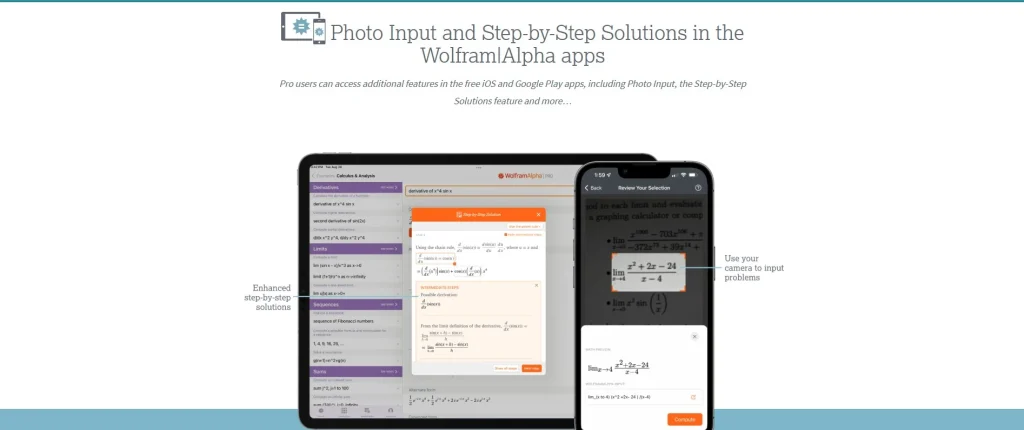
Step-by-Step Guide to Complex Problem Solving
Wolfram Alpha Pro offers a step-by-step guide for solving complex problems. Just enter your problem, and it breaks it down into easy parts. It explains each step clearly.
Generating and Understanding Detailed Solutions
The tool doesn’t just solve problems; it also gives detailed explanations for each step. This helps students grasp the concepts and logic behind the solutions.
Customizing for Different STEM Subjects
Wolfram Alpha Pro can be set up for various STEM subjects like math, physics, and chemistry. By choosing the right subject, you can make the tool fit your needs.
You can also create practice problem sets for exams using the tool’s database. This is super helpful for last-minute studying.
6. Scholarcy: AI Research Paper Summarization
Scholarcy is a top tool for summarizing complex papers in academic research. With so much research out there, it’s hard for students and researchers to keep up. Scholarcy makes it easier to quickly summarize research papers.
Processing Academic Papers in Minutes
Scholarcy’s AI engine can process papers in minutes. This saves a lot of time and effort. It’s great for students doing literature reviews or researchers who need to stay current. The tool can handle complex documents, making them easier to understand.

Creating Flashcards and Study Materials Automatically
Scholarcy can automatically create flashcards and study materials. This is a big help for students, letting them focus on learning instead of making study materials. The automatically generated flashcards are perfect for exam prep.
Building Comprehensive Literature Reviews
Scholarcy is also great for building literature reviews. It quickly summarizes many papers, helping researchers spot key themes and findings. This is key for identifying gaps in current research and suggesting new directions.
Organizing Research Findings Effectively
Organizing research findings is crucial. Scholarcy helps by providing a structured summary of papers. This makes it easier to compare studies, leading to better research synthesis. A well-known researcher said,
“The ability to quickly summarize and organize research findings is a significant advancement in research methodology.”
7. Synthesia Education: Creating Educational Videos
Synthesia Education is changing how students make educational videos with its AI tools. This platform lets students make top-notch, fun videos with AI avatars. It’s great for presentations, group work, and portfolios.
Creating Engaging Videos for Presentations
To start a video on Synthesia Education, pick a template that fits your needs. They have many templates for school use. Then, pick an AI avatar that matches your style. You can choose from many avatars to show off your content.
Step-by-Step Video Creation Process:
- Select a template that fits your educational content.
- Customize your AI avatar and adjust its settings.
- Input your script and let the AI generate the video.
- Review and edit the video as needed.
Customizing AI Avatars for Projects
Changing your AI avatar is key to making your content unique. Synthesia Education lets you change your avatar’s look, voice, and language. This makes your videos fun and right for your audience.
Enhancing Group Projects with AI Videos
AI videos can make group projects better by adding excitement. Using Synthesia Education in your group work makes videos that grab attention. They help share your message clearly.
Building an Impressive Digital Portfolio
Adding AI videos to your digital portfolio can make it pop. Synthesia Education helps you make videos that show off your skills. This makes your portfolio more appealing to employers or schools.

8. Elicit: AI-Powered Research Assistant
Conducting literature reviews just got easier with Elicit, the cutting-edge AI research assistant. Elicit is designed to help students and researchers streamline their research process. It makes academic success more achievable.
Conducting Thorough Literature Reviews
Elicit simplifies the process of conducting literature reviews by automating the search for relevant studies. It uses advanced algorithms to sift through vast databases. This way, it finds key papers and articles crucial to your research.
Finding and Analyzing Relevant Studies
Once Elicit has identified relevant studies, it helps you analyze these studies to extract valuable insights. This feature is great for understanding different perspectives on a topic. It also helps identify gaps in current research.
Creating Compelling Data Visualizations
Elicit enables you to create compelling data visualizations that present complex research findings in an engaging way. Visualizations can include charts, graphs, and infographics. They make your research more accessible.
Refining Research Questions for Better Results
With Elicit’s assistance, you can refine your research questions based on the insights gained from the literature review. This iterative process ensures your research stays focused and relevant.

9. Quillbot AI: Advanced Paraphrasing and Summarization
Quillbot AI makes learning easier for students. It simplifies complex texts, helping students do better in school.

Quillbot AI has many features for learning. It helps with note-taking and understanding texts better. Let’s see how it can help you learn well.
Effective Note Taking with Quillbot
Quillbot AI is great for taking notes. It changes hard information into easy-to-understand content. This way, students can get the main points of their study materials better.
- Find important ideas in your study materials
- Use Quillbot AI to make these ideas simpler
- Put the simplified content into clear notes
Paraphrasing Techniques for Better Comprehension
Quillbot AI is more than a tool; it’s a learning friend. It helps you understand complex texts better. By using its paraphrasing, students can dive deeper into their studies.
Summarizing Complex Textbook Chapters
Summing up long chapters can be hard. But Quillbot AI makes it easier. It lets you shorten complex info into brief summaries, making studying more effective.
Enhancing Reading Comprehension Skills
Quillbot AI also boosts reading skills. It breaks down hard texts into simpler versions. This is a big help for students who find academic texts tough.
Adding Quillbot AI to your study routine can really help. It improves your paraphrasing, makes summarizing easy, and boosts your reading skills. It’s a valuable tool for students aiming for success.
Conclusion: Building Your AI-Enhanced Study System
I’ve looked at the top 9 AI tools to change your study routine. These tools can make your study system better, helping you work smarter and succeed in school.
To start, figure out what you need and try out different tools. For example, ChatGPT-5 can help with your studies, Notion AI is great for notes, and Grammarly Ultra makes your writing better.
Using these tools together can make learning easier, keep you organized, and help you reach your goals. The secret to success is finding the right mix for you. This boosts your productivity and leads to better grades.